MENU

LARRYD keeps your agents from going rogue.

Free · for Mac and Linux · works with Claude Code

Your server has a daemon.
Your agents should have one too.

LARRYD is a free tool for building AI agents with Claude Code. It gives every agent the right shape, checks it for problems, and runs it in a sealed space where it can't touch anything it shouldn't.

What is LARRYD?

LARRYD Developer. LARRYD Observe. LARRYD Server.

LARRYD is a daemon that looks after AI agents. You build on a mini version of it, LARRYD Developer, on your own computer. Same walls. Same checks. Same runtime. When your agent is ready, it runs on the full one: LARRYD Server.

LARRYD Developer, in Claude Code

The free tool you install in a terminal with Claude Code, on your Mac or Linux computer: a mini version of the server. Build an agent with Claude Code, check it with the doctor, and run it sealed off, exactly the way the server will run it.

LARRYD Observe, in Positive Feedback

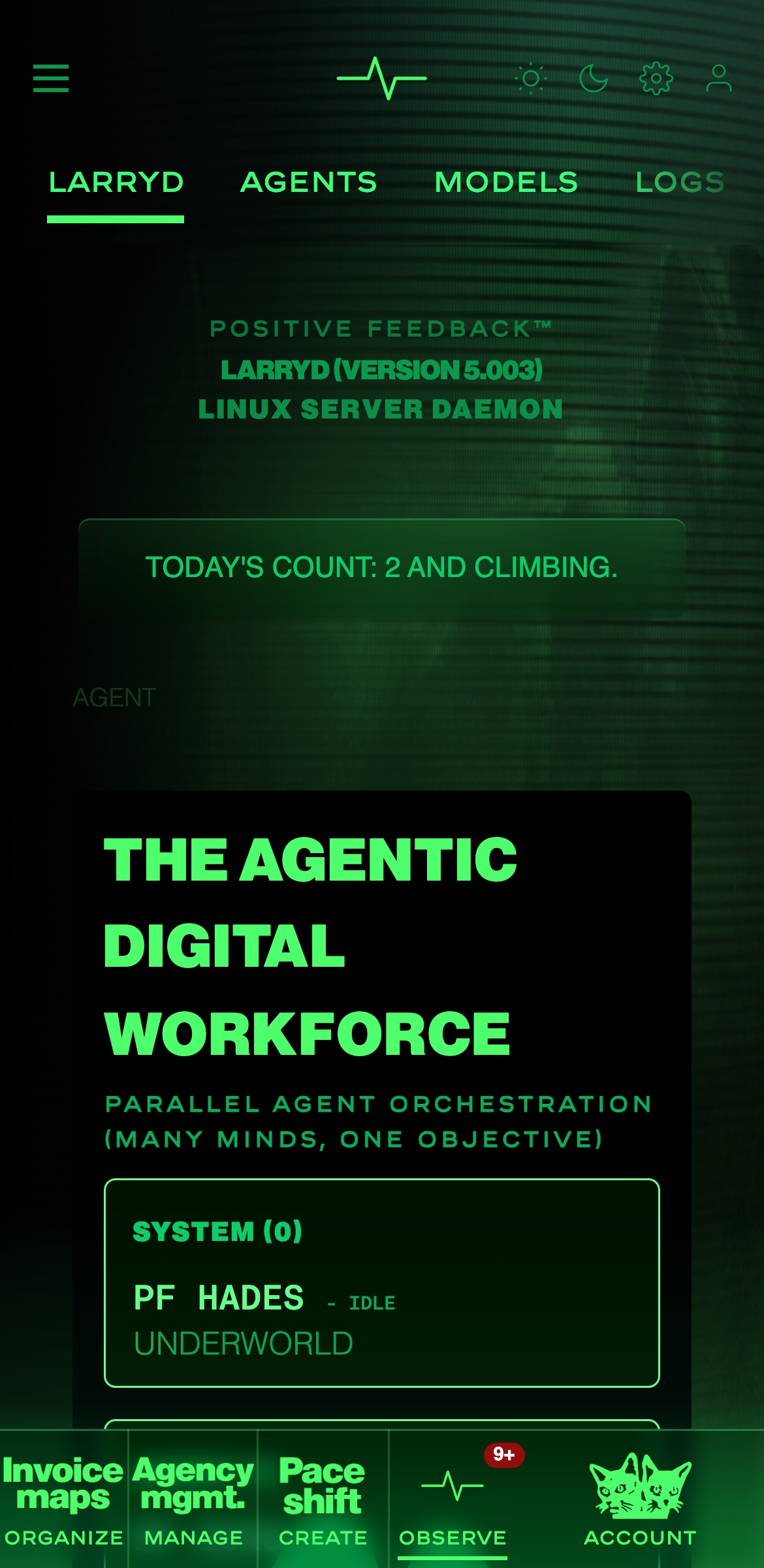
LARRYD is already part of the Positive Feedback platform. Under OBSERVE, the LARRYD page shows every agent on the server and what it is doing, with its models, its logs and its jobs.

LARRYD Server

Our full server software: the daemon that runs every approved agent on our platform. Each agent runs sealed off by the operating system's own walls, one job at a time, with no network and nothing but its own folder.

Install

One line. Pick the one you already have.

Every line installs the same LARRYD, on Mac and Linux. pipx, npm and cargo need Python 3.11 or newer (python3 --version tells you); uv brings its own. Inside a virtual environment, pip install larryd works as usual.

  • pipxpipx install larryd

    The safest Python way: LARRYD gets its own space. No pipx yet? brew install pipx, or sudo apt install pipx.

  • uvuv tool install --python 3.12 larryd

    Brings its own Python, so it works on any Mac or Linux computer. No uv yet? brew install uv.

  • npmnpm install -g larryd

    If you've installed Node.js, use this one.

  • cargocargo install larryd

    If you've installed Rust, use this one.

  • startlarryd

    Starts LARRYD's daemon in this terminal, on 127.0.0.1. Ctrl-C stops it. No sudo.

larryd mcp is the Claude Code connector. Type larryd help any time to see everything it can do. In Claude Code, just say "Install LARRYD for me".

Or let Claude Code do it

Paste this into Claude Code.

It installs LARRYD, starts it, connects it to Claude Code, and builds your first agent with you, one step at a time.

Claude CodePrompt
I want to install LARRYD on this machine and start building AI agents with you.
Read this whole prompt before you do anything. Then follow the plan, one phase at a time.

═══════════════════════════════════════════════════════════════
WHAT LARRYD IS
═══════════════════════════════════════════════════════════════

LARRYD is a daemon that looks after AI agents. Two things, same name:
- LARRYD Developer: the mini version on my computer. This is where
  I build, with you.
- LARRYD Server: the full version. This is where approved agents run.

LARRYD gives every agent its shape, checks it before it runs
(larryd doctor), and runs it sealed off: no internet, none of my
files, no other programs, one job in and one answer out. Same walls
and same checks on both.

It runs on Mac and Linux (on Windows, use WSL). The daemon listens on
127.0.0.1:5010 (LARRYD_PORT picks another port). Ctrl-C stops it.
No sudo.

═══════════════════════════════════════════════════════════════
THE PLAN
═══════════════════════════════════════════════════════════════

Phase 0: Look around
  Check: python3 --version, uv --version, pipx --version,
  node --version, cargo --version, and whether brew or apt is here.
  Tell me what you found, in a few lines.

Phase 1: Install
  Use the first line that fits what you found:
    pipx install larryd        (needs Python 3.11 or newer)
    uv tool install --python 3.12 larryd     (brings its own Python)
    npm install -g larryd      (needs Node and Python 3.11 or newer)
    cargo install larryd       (needs Rust and Python 3.11 or newer)
  Then run: larryd --version
  If it shows a version older than 0.1.0, or says the first public
  release is coming, stop and tell me.
  If nothing here can install it, stop and tell me what to install
  first. Don't install anything else on your own.

Phase 2: Start the daemon
  Run larryd as a background process (it keeps running until it is
  stopped). Check that 127.0.0.1:5010 answers. If the port is taken,
  tell me.

Phase 3: Learn the tool
  Read the output of: larryd help
  Connect LARRYD to Claude Code:
    claude mcp add larryd -- larryd mcp
  Tell me if this session needs a restart to see the LARRYD tools.

Phase 4: Brief me, in plain words
  - the one command to start LARRYD again tomorrow
  - how to ask you for a new agent
  Then say "ready" and wait.

Phase 5: The first agent
  When I describe an agent, run larryd new <name>, read the
  instructions it writes for you first, and build it with me.
  Then run larryd doctor <name> and larryd run <name>, and show me
  both results.

═══════════════════════════════════════════════════════════════
RULES
═══════════════════════════════════════════════════════════════

- Read this whole prompt before acting.
- Don't install anything I didn't ask for.
- No sudo unless a step truly needs it, and ask me first.
- If a step fails, stop: say what broke and what you'd try next.
- Short answers. One phase at a time; confirm before moving on.

═══════════════════════════════════════════════════════════════

Start with Phase 0.

Three steps

Install. Build. Submit.

Nothing to carry: no account to make, no key to keep, no secret to paste.

  1. 1

    Install

    One line from above, or paste the prompt into Claude Code and it installs LARRYD for you.

  2. 2

    Build and test

    In Claude Code, say "Make me a LARRYD agent that…". larryd new, larryd doctor and larryd run work on your own computer, no account needed.

  3. 3

    Submit

    Type larryd submit. Your browser opens; sign in with Google or Apple, and your agent goes to review. That sign-in is the only gate.

What it is

A home for the agents you build

An AI agent is a small program that does one job for you: answers a question, writes a report, makes a set of colours. LARRYD is the daemon that looks after them, from the first idea to the day someone uses them.

Build

Type larryd new and a name. You get a ready project with clear instructions that Claude Code reads first, so you can describe what you want in plain words.

Check

larryd doctor looks over your agent before anyone else does. Every problem comes with the file, the line, what is wrong and what to do: words Claude Code can act on by itself.

Run

larryd run tries your agent on your own computer, sealed off the same way it will run for real: no internet, no private files, one job in and one answer out.

Share

larryd submit sends your agent for review. Once it is approved, people add it with one switch.

Open

Safe by design

What your agent can't do.

Every agent runs sealed off, on your computer and on LARRYD. These hold for every agent, every run.

  • It can't reach the internet. No network at all. What it needs is handed to it.
  • It can't open your files. It reads its own folder and writes only to a scratch folder that is deleted after every run.
  • It can't start other programs. No new process, nothing else on your machine.
  • It can't carry secrets. The doctor refuses an agent with a password or key inside, before it ever runs.
  • It answers only what it's handed. One job in, one answer out, with nothing else around it and a time limit.

Every agent, every run

The walls around every agent

These hold whatever the manifest says. On a Mac they are macOS sandbox-exec; on Linux, bubblewrap with a seccomp filter. Where neither is present, nothing runs.

  • No network at all. What it needs is handed to it.
  • No other programs. It cannot start a process.
  • None of your files. On a Mac it reads nothing in the home folders but its own folder; on Linux, nothing but its own folder and the Python runtime. It writes only to a scratch folder, deleted after the run.
  • One job in, one answer out. One JSON object each way, in an empty environment, inside a time limit.

The badge

Show that your agent passes

Run the doctor with --badge. It writes larryd-checks.svg beside agent/: PASS in gold or FAIL in red, with the day and the checks' version. Paste the line it prints into your README.

ProblemsOutputDebug ConsoleTerminalPortszsh
$ larryd doctor weather-report --badge
larryd doctor: /Users/Shared/weather-report
PASS the project
PASS the manifest
PASS the entry
PASS the air gap
PASS no secret
PASS the shape
PASS the skills
PASS the knowledge
the agent passes every check
wrote /Users/Shared/weather-report/larryd-checks.svg: paste ![LARRYD checks](larryd-checks.svg) into your README

LARRYD checks v1: PASS

LARRYD Observe

Monitor your agents in Positive Feedback

LARRYD is fully integrated into the Positive Feedback platform already. Open OBSERVE and the LARRYD page shows the server, every agent on it and what each one is doing, with its models, its logs and its jobs.

The LARRYD page in the Positive Feedback app on iPhone, under OBSERVE
THE AI STACK IS:
POSITIVE FEEDBACK™ — AI AGENTS AND INFRASTRUCTURE
APPS: INVOICE MAPS, AGENCY MGMT, PACE SHIFT, LARRYD
« NOTE: OTHER COMPANIES STOP HERE… FRONT END, BACK END, DATABASE, DEVOPS, INTEGRATION. WE GO WAY BEYOND WHAT OTHER COMPANIES CALL A FULL STACK. »
QUANTUM AI: FOR CLASS III AGENTIC AGENTS (SKIN TEXTURE AND SSE VIDEO EDITING)
IBM QUANTUM API: HYBRID QAOA, QUANTUM KERNELS, SEEDS, TRAINING
SECURITY: FROST IDENTITY, SSO (APPLE AND GOOGLE), RSA, ACTIVE MONITORING
STORAGE: DA-M (DIGITAL ASSET MANAGEMENT), CDN, VDN
TOKENIZED CURRENCY: MTOK, MTOK PAY, MTOK LOOT
LARRY LLM: OUR AI MODEL (V5.050)
LARRYD: OUR OWN NATIVE LINUX DAEMON (DEVELOPER, OBSERVE, SERVER)
PF LINUX DEV SERVER: TWO RTX6000S. ZERO WATER FOR COOLING
PF MACOS DEV SERVER: M5 MAX. 8TB SSD
PROD COMPUTE: GCP, AWS. WORLDWIDE. UNLIMITED.
NATIVE: IPHONE, MAC OS, APPLE TV, APPLE WATCH, ANDROID, WINDOWS
OUR AI HITS HARDER BECAUSE IT’S BUILT ON CUSTOM EXXACT SILICON, OUR OWN LINUX FOUNDATION, AND QUANTUM-NATIVE INTEGRATION EMBEDDED DIRECTLY INTO THE DAEMON, STACKED FROM THE BOTTOM UP.


For IT leaders

Air-gapped. On your own machines. Your models.

Air-gapped

Every agent runs with no network at all. Nothing calls out; what it needs is handed to it. Agents reach the platform by API only, and the data never leaves it.

On-prem

The daemon runs on your own machine, not ours. Every agent is sealed by your operating system's own walls, and nothing runs where those walls are missing.

Your models

An agent can't reach any AI service on its own and can't carry a key. Nothing leaves unless you hand it over, so your models and your data stay on your side.

Version 1

The LARRYD checks

larryd doctor runs these eight checks on an agent, in this order, before it runs and before it is sent anywhere. Its output names them the same way. Every failure says the file, the line, what is wrong and what to do.

  1. 1

    the project

    Proves: There is an agent here: a real agent/ folder (not a link) holding agent.json.

    Why: Everything else is checked inside agent/, and only agent/ is ever sent or run.

  2. 2

    the manifest

    Proves: agent.json is one JSON object with every field and no others. run.do is one of does; calls only names what is in does; run.hands asks only for what LARRYD hands (cards, job); each input has its own slot.

    Why: The manifest is the agent's promise: what it does, what it is handed, what it answers. The runtime holds the agent to it.

  3. 3

    the entry

    Proves: The entry file exists, compiles, has a function for every name in does, and runs as a program.

    Why: An agent that cannot start, or that promises a function it does not have, fails in front of a person.

  4. 4

    the air gap

    Proves: No network module, no module that starts processes, no hidden imports, nothing outside the Python standard library and the agent's own files, no path outside its own folder.

    Why: An agent never reaches out. What it needs is handed to it.

  5. 5

    no secret

    Proves: No file named like a secret (.env, .pem, id_rsa, …) and no text that looks like a key, token or password.

    Why: An agent holds no secret. Keys belong to the developer, never to the agent.

  6. 6

    the shape

    Proves: agent/ holds only plain, visible UTF-8 files of the kinds an agent holds (.py, .json, .txt, .md, .csv), and no links.

    Why: What is checked is exactly what runs: nothing hidden, nothing that points elsewhere.

  7. 7

    the skills

    Proves: Every skill the agent declares exists (larryd skills lists them by hash).

    Why: The runtime carries out declared skills for the agent; a skill that does not exist would fail the run.

  8. 8

    the knowledge

    Proves: Every knowledge pack the agent declares is one LARRYD holds.

    Why: An agent may only lean on knowledge LARRYD can hand it. LARRYD holds none yet, so this is [] today.

The manifest

Declared in the manifest, enforced when it runs.

The doctor checks what the manifest declares. When the agent runs, the runtime holds it to the same words.

  • run.do The agent is asked to do exactly that one thing.
  • run.hands It is handed only what it names. A hand LARRYD does not have fails the run.
  • inputs The job's inputs reach it only by the names and slots declared.
  • skills Only declared skills are carried out. An answer that carries files is refused unless the agent declares the DA-M store.
  • calls Only an agent that declares calls answers on a member's screen.
  • gives An answer that holds anything gives does not name is refused, by larryd run and by LARRYD's runtime: the run fails, nothing is delivered, nothing is charged.

Questions

Good questions, short answers

For developers

What is an AI agent?

A small program that does one job well, for example turning a few words into a set of brand colours, or writing a short report from a list. You ask, it answers.

Do I need to know how to code?

It helps, but Claude Code writes most of it with you. LARRYD's instructions and its doctor make sure what gets written is safe and in the right shape.

What does "daemon" mean?

A helper that runs quietly in the background. Your computer has many. LARRYD's daemon is the one that runs your agents, safely, one job at a time.

Is it really free?

Yes. Installing and using LARRYD on your own computer costs nothing.

For IT

Which computers does it work on?

Mac and Linux. Trying an agent on your own computer (larryd run) works on both: sandbox-exec on a Mac, bubblewrap with a seccomp filter on Linux. On Windows, use WSL.

Where does my agent run when others use it?

On LARRYD, sealed off from the internet and from everything else.

Can an agent reach the internet?

No. Every agent runs with no network at all. What it needs is handed to it.

How we build

Our own Linux. Our own daemon. Our own metal.

Our AI hits harder because it's built on custom Exxact silicon, our own Linux foundation, and quantum-native integration embedded directly into the daemon, stacked from the bottom up.

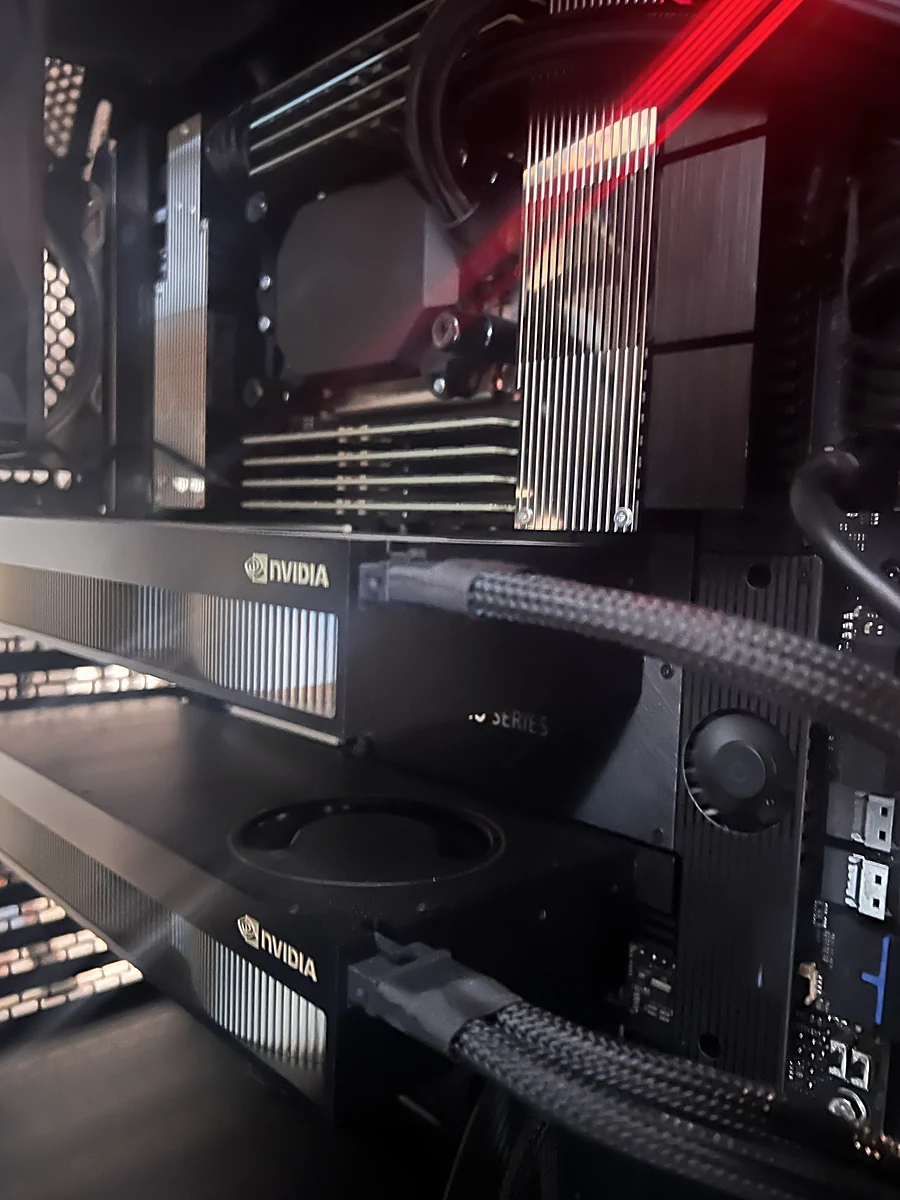
  • PF Linux. Our dev server runs our own Linux: two RTX 6000s, zero water for cooling.
  • Our own daemon. LARRYD itself. Every agent is sealed off by the operating system's own walls: bubblewrap with a seccomp filter on Linux, sandbox-exec on a Mac.
  • Our own metal. We designed the server architecture in-house and contracted Exxact Corporation (Fremont, CA) to build it.
INFRASTRUCTURE
Our Own Silicon
Inside the Positive Feedback™ server — dual NVIDIA RTX PRO 6000 Blackwell GPUs
PERFECTLY CONNECTED. ORGANIZE. MANAGE. CREATE. OBSERVE.
Built to Run Every Frontier Model at Once
The system runs all major frontier models simultaneously — DeepSeek, Claude, Qwen, and LARRY LLM — for continuous testing and validation. We also operate our own video delivery network supporting 8K and 12K streaming.
We designed the server architecture in-house and contracted Exxact Corporation (Fremont, CA) to build it.
  • LARRY LLM (version 5.050)
  • PF Core Engine
  • PF Modules (Contacts, Invoices, Locations, Operations)
  • SSE live streaming — real-time content delivery to connected browsers
  • GIS mapping — interactive dot maps, outline maps, geocoding
  • 13-step pipeline — inbound → process → outbound factory
  • Gate controller — app factory that spawns all core stack gates from the same codebase
NO WATER COOLING IN OUR LAB
§ 7. ATTRIBUTIONS AND TRADEMARK NOTICE. POSITIVE FEEDBACK™ AND COTECLAT LLC DO NOT OWN THE NAMES, LOGOS, OR INTELLECTUAL PROPERTY OF NVIDIA CORPORATION. NVIDIA, RTX, AND BLACKWELL ARE TRADEMARKS OF NVIDIA CORPORATION. EXXACT IS A TRADEMARK OF EXXACT CORPORATION, WHICH BUILT OUR SERVER HARDWARE UNDER CONTRACT. DEEPSEEK, CLAUDE, AND QWEN ARE THE PROPERTY OF THEIR RESPECTIVE OWNERS.
CPU
Threadripper PRO 7955WX
STORAGE
20G/49G 40%
RAM
503 GB
NVIDIA GPU 1
RTX 6000 PRO
NVIDIA GPU 2
RTX 6000 PRO
ARCHITECTURE
Blackwell
VRAM
196GB GDDR7
CUDA
13.1
VERIFIED HARDWARE

CPU — AMD Ryzen Threadripper PRO 7955WX: 16 cores, 32 threads, 4.5 GHz base / up to 5.3 GHz boost, 64 MB L3 cache, 350W TDP. AMD official specifications.

GPU — 2× NVIDIA RTX PRO 6000 Blackwell (Server Edition): 96 GB GDDR7 with ECC per card, 192 GB pooled VRAM. NVIDIA Server Edition · RTX PRO 6000 family.